 Fairstack

Kleithra
Kleithra знаходить форму входу в програмах, іграх і браузерах і заповнює її за вас. Steam Guard, Battle.net і одноразові коди зберігаються поруч із паролями, зашифрованими на вашому комп’ютері.
Огляд сховища
Які паролі слабкі або повторюються, які форми входу агент уже знайшов і чим ви користувалися нещодавно.
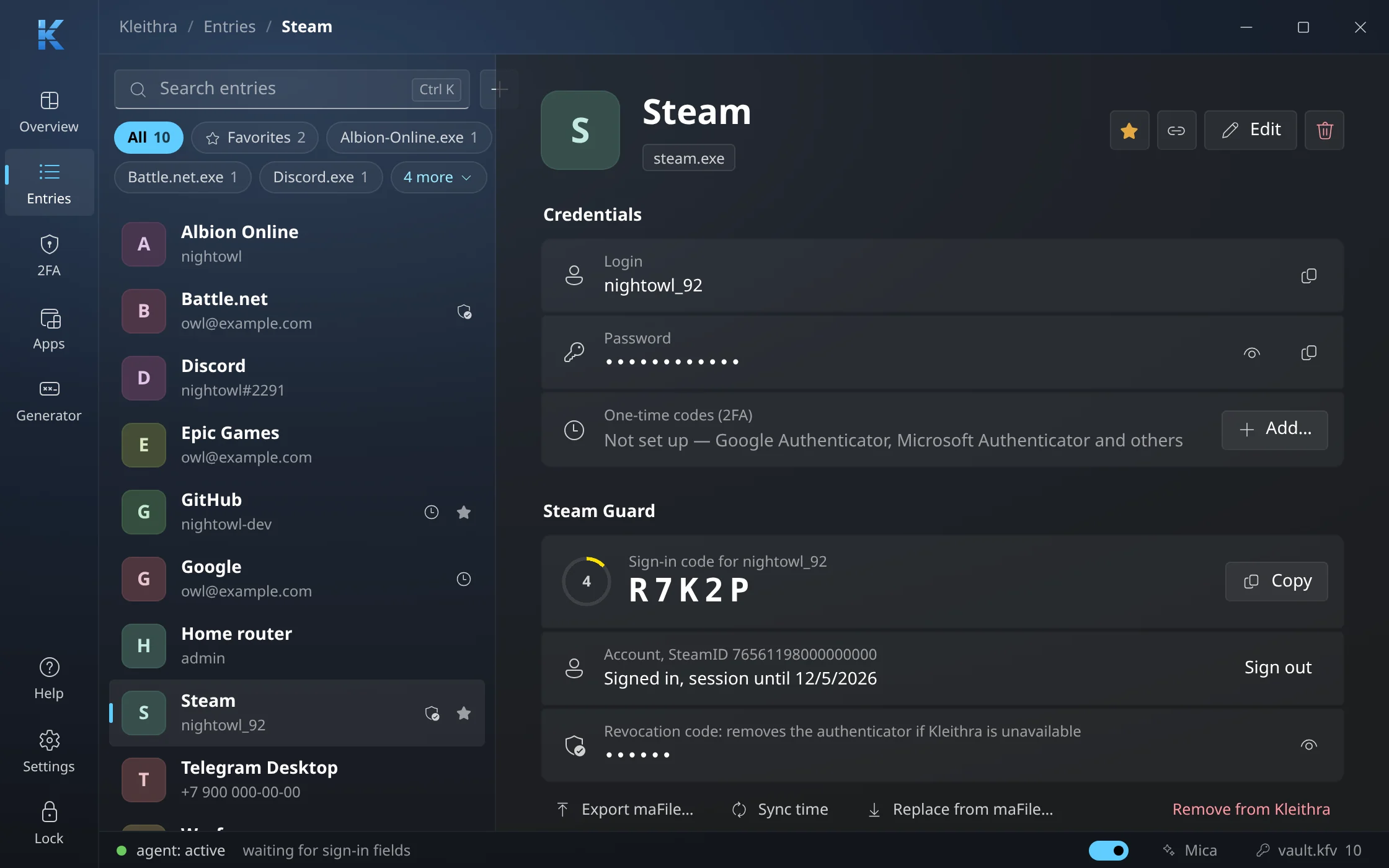
Steam Guard поруч із паролем
Код входу зі зворотним відліком, сесія Steam, код відновлення й підтвердження обмінів — просто в записі.
Усі коди 2FA на одній сторінці
Коди Steam Guard, Battle.net і застосунків-автентифікаторів оновлюються самі, нижче — підтвердження торгового майданчика.
Сайти та їхні програми
Зв’яжіть сайт із його лаунчером або грою — записи сайту пропонуватимуться й там. А ще Kleithra запам’ятовує, хто підписав кожну програму.
Автозаповнення й автоввід
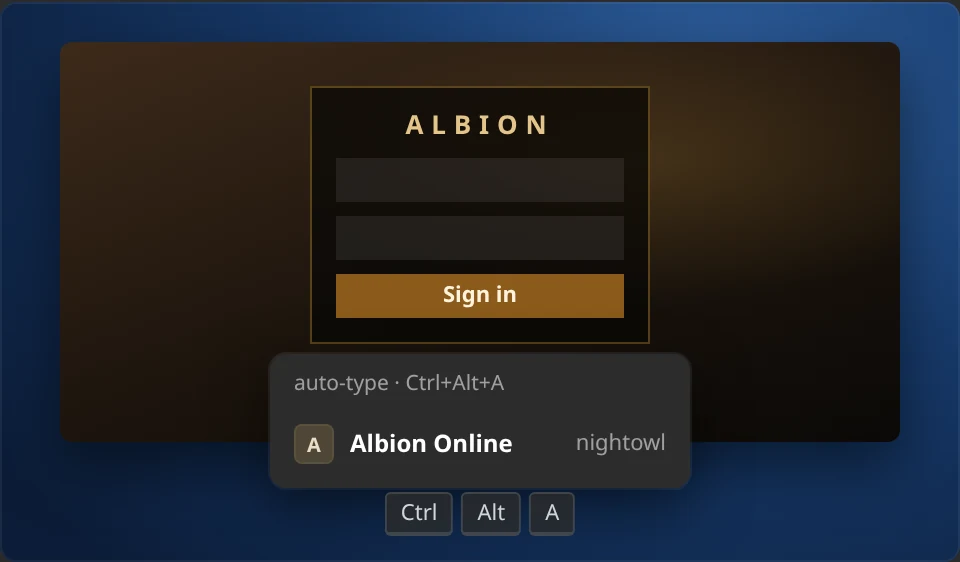
Підказки в програмах, автоввід в іграх гарячою клавішею Ctrl+Alt+A і пропозиція зберегти пароль, який ви ввели самі.
Вхід і автоблокування
Windows Hello замість майстер-пароля; сховище блокується без вашого введення, разом із Windows і після сну.
Переїзд з іншого менеджера
Паролі з браузерів і менеджерів, ключі 2FA за QR-кодом і maFile зі Steam Desktop Authenticator — уже в майстрі першого запуску.
Генератор паролів
Довжина, набори символів і схожі символи налаштовуються, а надійність пароля видно одразу.
1 / 8
У справі
Поруч із кожним полем входу.
Сцени з огляду можливостей, вбудованого в Kleithra.
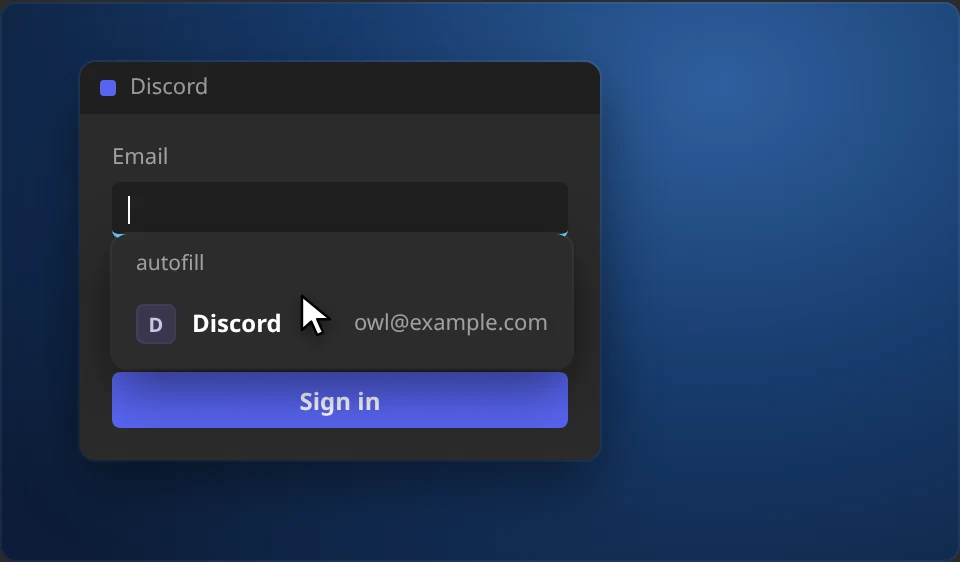
Підказка біля поля входу
Клацніть у поле логіна або пароля в будь-якій програмі чи браузері — Kleithra покаже записи для неї. Вибір заповнює і логін, і пароль.
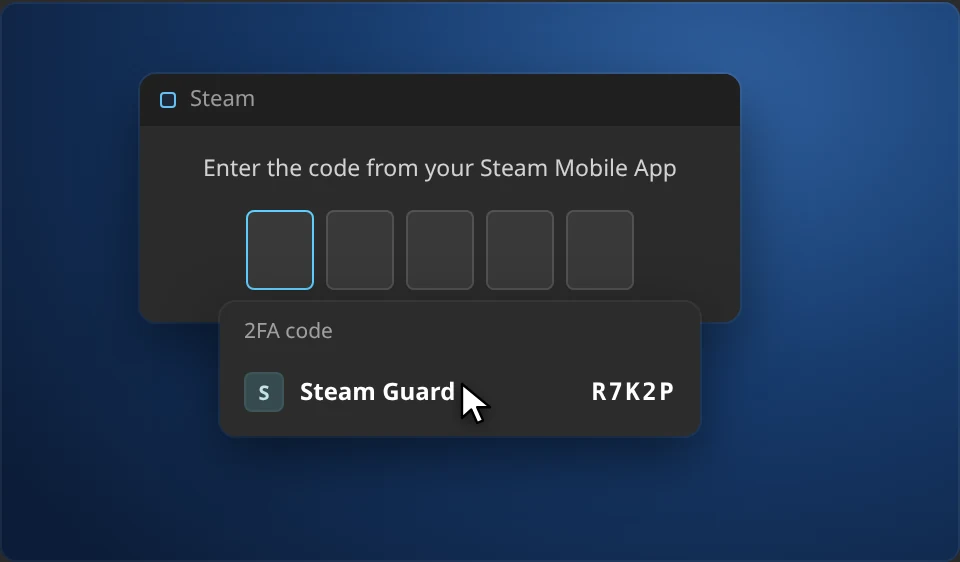
Код 2FA — коли його запитають
Вікно просить код Steam Guard, Battle.net або застосунку-автентифікатора — Kleithra запропонує ввести його. Комірки коду заповнюються самі, а код, що спливає, чекає наступного.
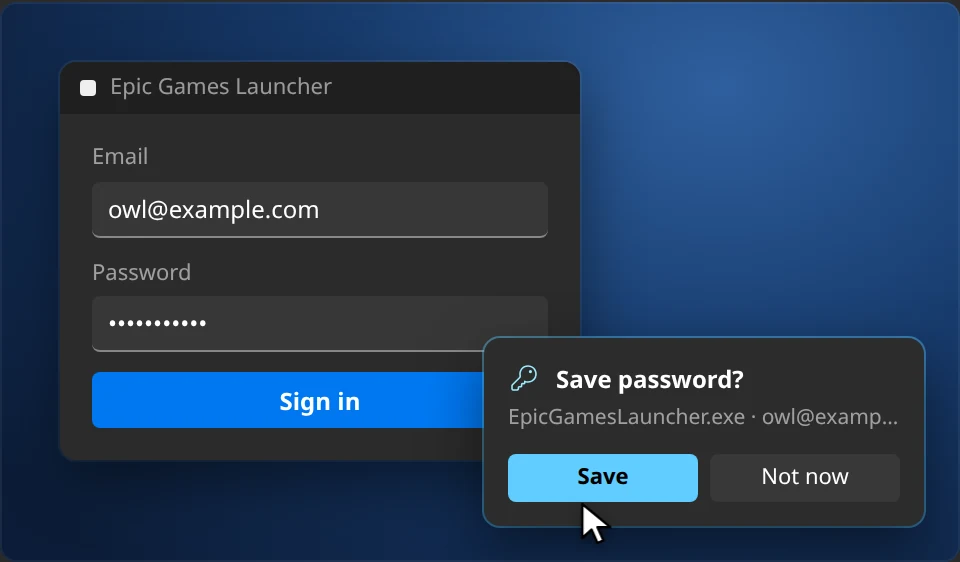
Нові паролі зберігаються самі
Ввели пароль вручну — Kleithra запропонує зберегти його або оновити запис. Натискання читаються лише в полі пароля й не залишають пам’ять.
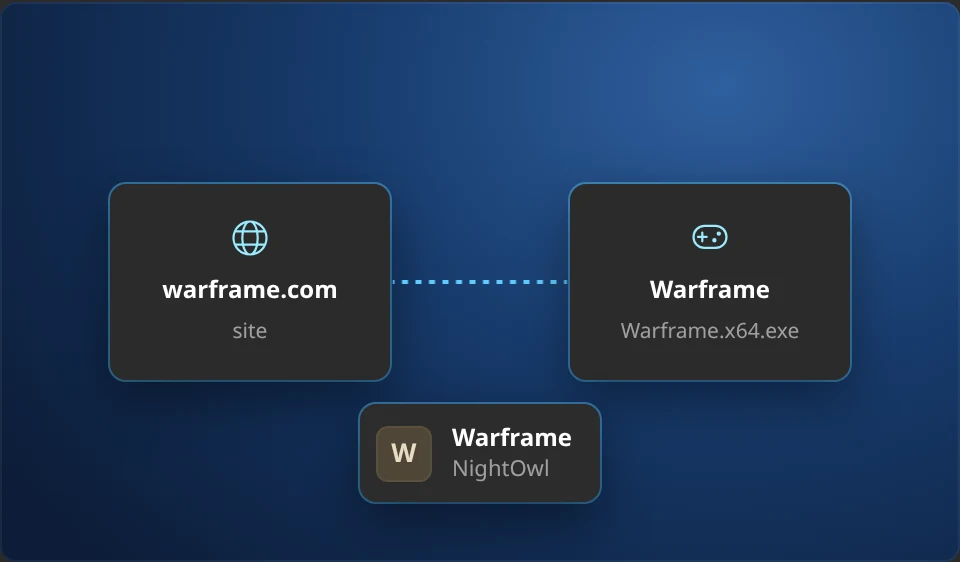
Сайт і програма — один запис
Пароль від сайту часто потрібен і в його лаунчері. Kleithra знає пари на кшталт warframe.com і Warframe, а свої зв’язки додаються в один клік.
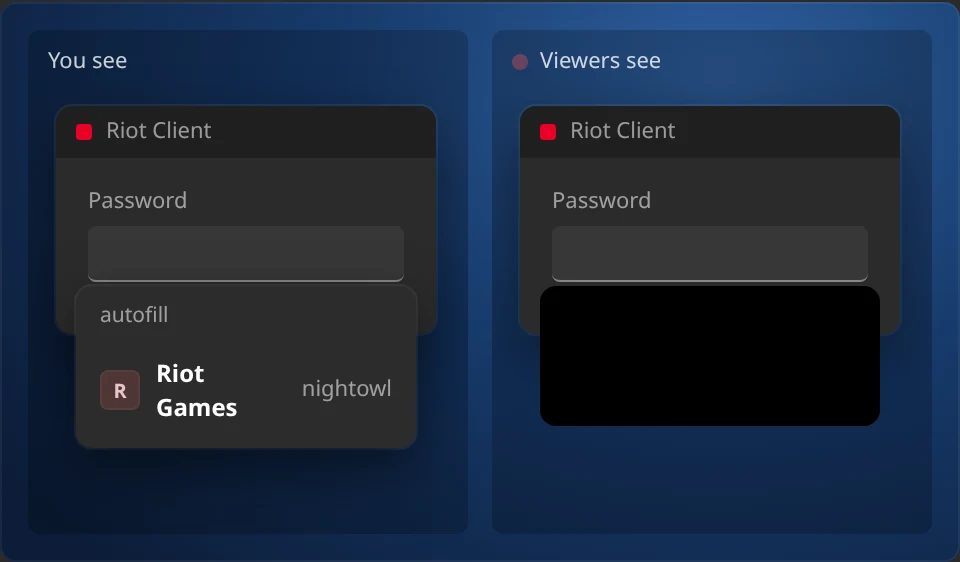
Режим стрімера
У Windows, поки запущено OBS, Streamlabs або іншу програму трансляції, вікна й підказки Kleithra бачите лише ви — у запис і в ефір вони не потрапляють.
Для гравців
Один клік на екрані входу.
Клацніть на екрані входу гри — Kleithra покаже картку з акаунтами. Вона сама вирішить, чи треба вводити логін, замінить чужий, введе пароль і натисне Enter. Гаряча клавіша працює навіть в ексклюзивному повноекранному режимі.
- Знаходить форму входу за зображенням на екрані, мовами, які розпізнає система
- Працює з іграми, запущеними від імені адміністратора, наприклад Warframe
- Кілька акаунтів на гру — потрібний обирається за логіном
Steam Guard і Battle.net
Мобільний автентифікатор — на комп’ютері.
Kleithra вміє те саме, що Steam Desktop Authenticator: показує коди входу, входить в акаунт Steam і підтверджує обміни та лоти торгового майданчика. Battle.net Authenticator працює так само — коди з 8 цифр поруч із паролем.
- Імпорт maFile, зокрема зашифрованих у SDA
- Підтвердження обмінів — по одному або всі одразу
- Прив’язка нового автентифікатора і зняття кодом відновлення
- Експорт maFile назад — нічого не залишається під замком
Безпека
Уважно стежить, кому віддає паролі.
Шифрування на пристрої
Argon2id і XChaCha20-Poly1305. Сховище — файл на вашому ПК; із синхронізацією в акаунт іде лише цей зашифрований файл, а майстер-пароль не залишає комп’ютер.
Перевіряє програму
Kleithra запам’ятовує, хто підписав steam.exe. Підробка з теки «Завантаження» нічого не отримає.
Перевіряє сайт
Попереджає про сайт-двійник до того, як пароль потрапить на фішингову сторінку.
Блокується сама
Коли вас немає, під час блокування комп’ютера і після сну. Гра вважається присутністю.
Паролі залишаються вашими.
Kleithra не потрібен акаунт: сховище лежить на вашому комп’ютері. Синхронізація між комп’ютерами — за бажанням, і передається лише зашифрований файл сховища, замкнений майстер-паролем, якого ми не бачимо. В іншому Kleithra виходить у мережу лише щоб перевірити оновлення, завантажити значки сайтів і звернутися до Steam або Battle.net, коли ви користуєтеся цими функціями.
Переїзд — за хвилину.
Імпорт із Chrome, Edge, Firefox, Bitwarden, KeePass, 1Password та інших, а також із Google Authenticator і Steam Desktop Authenticator. Експорт — повний: нічого не залишається під замком.
Ранній доступ: допоможіть довести Kleithra до блиску
Kleithra безплатна — усі функції, для всіх. Поки триває ранній доступ, щось може зламатися: якщо так станеться, надішліть нам баг-репорт. Це займе хвилину, і він потрапить просто до розробника.
Тарифи
Підтримайте Kleithra
Kleithra безплатна й такою залишиться. Підписка Supporting підтримує її розробку й додає синхронізацію сховища між комп’ютерами. Оплата на fairstack.dev, ключ вводиться в застосунку.
Supporting
Supporting Синхронізація сховищ
3,00 USD на місяць
- Підтримка незалежної розробки Kleithra
- Син�
- ронізація с�
- овища між вашими комп’ютерами з наскрізним шифруванням
- Скасування будь-коли — усі функції програми залишаються безплатними
- До 5 пристроїв
Завантажити
Завантажити Kleithra
Для Windows 10 і 11 та Linux: .deb для Ubuntu і Debian, AppImage для інших дистрибутивів.
Windows
v0.8.1 · 11 жовтня 2026
Windows x64 · 5.1 MB
Linux
v0.8.1 · 11 жовтня 2026
.deb x64 · 8.1 MB
AppImage x64 · 82.5 MB
Історія змін
-
v0.8.1
ОстанняВиправлення- The autofill hint no longer appears in search and filter boxes such as "Find a host or ssh user@hostname…" in Termius.
- Windows: launchers with an embedded web UI (ArcheAge Classic and others built on Tauri and WebView2) get the entries of the app itself and its linked site, not the entries for localhost and 127.0.0.1.
-
v0.8.0
Нове- Light theme. Settings → General → Appearance → Theme: as in the system (the default, following the Windows or Linux app mode), light or dark. Buttons and links use the dark shades of the Windows accent color, as in Windows 11 light apps.
Покращення- Windows: the autofill hint and the auto-type card move with the window when it is dragged instead of staying at the old place; minimizing the window closes the hint.
- Windows: auto-type in games in exclusive fullscreen: the sign-in form is searched on a Windows.Graphics.Capture snapshot when the regular screenshot comes out black.
Виправлення- Steam QR sign-in was not offered in the Steam client: the QR code in the client's sign-in window is too small for the recognizer. Kleithra now finds it and shows Sign in as….
- The 2FA code hint no longer appears on pages that merely contain the text 2FA (for example a README on GitHub while searching the page): the browser's find bar is not a code field, and text on a page is not a code screen.
-
v0.7.1
Нове- Help → Report a bug: a report to the developer right from Kleithra — with the app and system versions and, if you like, the log. The reply comes to your fairstack.dev account email, and My reports shows where each report stands. Without a key, the form on the site opens.
Покращення- With a beta version installed and the stable channel selected, Settings → Updates says a stable version comes once one newer than the installed version is out, instead of “You have the latest version”.
Виправлення- Linux: links to fairstack.dev and the Steam Community Market open in the browser.
-
v0.7.0
Нове- Kleithra is entirely free: the auto-type card in games on click, 2FA code suggestions at fields, Steam sign-in, trade confirmations and appraisal, Battle.net sign-in and authenticator setup work for everyone without a key. Kleithra Pro is gone.
- Vault sync between computers (Settings → Sync) — with the Supporting subscription, which backs development. Only the encrypted vault file goes to your fairstack.dev account — it cannot be read without the master password. Edits are sent right away, and entries from other computers appear on their own. If an entry password was changed on two computers before they synced, both are kept. A vault created on another computer can be combined with this one. If many entries are removed at once on another device, Kleithra asks before removing them here, and entries removed by sync can be brought back from a backup.
- Sync can be turned on during the first setup of Kleithra, and a second computer can download the vault from the cloud instead of creating a new one.
- The key can be changed right on the License or Sync tab with “Change key”; the previous key’s place on this computer is freed.
- The master password can be changed (Settings → Security). The encryption key changes with it, so the old password and everything encrypted with it open nothing anymore.
- Kleithra starts in the tray on every launch, not only at autostart: the vault stays locked until you open the window or autofill asks to unlock it. Turn it off in Settings → General → Start in the tray.
- “Forgot the master password?” on the sign-in screen: Kleithra explains what can be done, or sets the vault aside (the file is not deleted) and offers to create a new one.
- Linux: Kleithra offers to save a password you typed yourself or to update the entry — in apps, games and browsers running on X11 or XWayland.
Покращення- While the vault is locked, the “Unlock Kleithra” suggestion appears at the login field too, not only at the password field.
- The offer to add a login to an entry without one now also appears when the login is typed after the password was filled in. A login field is also recognized by an example email address as its label (“[email protected]”).
- Linux: programs linked to entries on Windows are recognized here too (Telegram, Firefox, Edge and others), in suggestions and site links. A newly installed program shows up in the programs list right away.
Виправлення- When the key’s plan no longer includes sync, the Sync tab says so and offers to change the key instead of showing a sync error. It no longer offers to turn sync on with such a key — before, entering the master password still ended in an error.
- Linux: the autofill suggestion is no longer half size when Kleithra starts at sign-in before GNOME sets the screen scale, and it no longer appears in Kleithra’s own fields.
- Linux: in Firefox the password no longer lands in the login field, the field’s old value is replaced instead of appended to, and the keyboard layout no longer switches back and forth while typing.
- Linux: in sign-in dialogs inside a page (such as Twitch) the suggestion opens under the field, and the paired field is found and filled.
- Linux: notifications in the Kleithra window no longer stay on screen forever when animations are turned off in the system, and without a tray area (GNOME without the AppIndicator extension) Kleithra starts with its window instead of invisibly.
Безпека- Turning sync on, replacing or deleting the cloud copy, confirming a mass removal of entries and exporting passwords, 2FA keys and Steam maFiles as plain text require the master password — even when the vault was opened with Windows Hello or the system password.
- Sync turns on only with a strong master password: a copy taken from a hacked account can be guessed without limits. It refuses to run when the computer’s clock is more than a day off the server.
- Linux: the system sign-in key is kept in kernel memory instead of the keyring on disk, and lasts 7 days and until a restart — then the master password is needed again. Keys that earlier versions left in the keyring are removed at startup.
-
v0.6.0
Нове- Kleithra for Linux (X11 and Wayland): a .deb package and an AppImage. Suggestions at sign-in fields in apps and browsers, login and password filling, auto-type in Wine and Proton games with sign-in form recognition, the auto-type hotkey, sign-in with your system password or fingerprint instead of the master password, 2FA codes from the screen.
Покращення- Auto-type in games clears the login field completely (select all, then spare Backspaces) and always clears the password field before typing: repeated auto-type no longer appends the login and password to what is already there.
Виправлення- A "Forgot password?" link garbled by text recognition ("Fongot Password") is no longer taken for the password field, so auto-type no longer clicks it instead of the field.
Показати ранніші версії
-
v0.5.1
Безпека- An update is installed only if the version in its digital signature matches the one the server announces: even a spoofed server cannot pass an old Kleithra version off as a new one.
- Item images and avatars in Steam confirmations are checked more strictly before they reach the Kleithra window.
-
v0.5.0
Нове- Kleithra Pro: the Settings → License tab — enter a key bought on fairstack.dev, remove this device, links to buying and to your account. The license is checked without going online. Early access is on now: Pro features (the auto-type card in games, filling 2FA codes into fields, Steam sign-in and confirmations, attaching Battle.net) are free for everyone.
Покращення- Updates now come from fairstack.dev, which also hosts the Kleithra page and every version for download. Update notes are in the language of the interface.
-
v0.8.0-beta.3
Покращення- Steam QR sign-in can be turned on or off during the first setup.
- Windows: the Sign in as… menu at the QR code on a Steam sign-in page in a browser appears right away, without clicking a field.
Виправлення- iPhone: when Steam revokes a session early, Kleithra renews it and retries by itself — when loading confirmations, trade contents and on QR sign-in, as on the computer — instead of a "Steam session expired" error.
Безпека- A site with an address like `https://evil.com/[email protected]` is no longer taken for the site after `@`: before, Kleithra would have offered that site's entries on it.
- Steam QR sign-in: Kleithra looks for the QR code only on Steam sign-in pages, not on any Steam page: profiles, screenshots and the Workshop can show other people's images with a QR code that signs an attacker in. A QR sign-in from the Steam client is now approved in the Kleithra window, where you see the device, location and IP: client chat and broadcasts can show other people's images too.
-
v0.8.0-beta.2
Нове- Steam Guard: sign in to Steam with a QR code, as in the Steam app. In the Steam client or on the website, choose to sign in with a QR code, then in Kleithra choose Scan QR code… on the account card (on a computer: from the screen, a selected area or the clipboard; on iPhone: with the camera). Before you approve, you see which device is signing in, from where and from what IP, plus a warning if Steam finds the location suspicious.
- Steam Guard: no need to scan the sign-in QR code. Kleithra notices it in the Steam client and on Steam websites as soon as it appears and shows a Sign in as… menu with your accounts. Pick an account and the sign-in is approved; a card right there confirms it. If Steam warns about the sign-in (unusual location, many sign-ins from the address), Kleithra first shows who is signing in and asks. Turn it on or off in Settings → Autofill → Steam sign-in with QR code (on Linux it stays off until you turn it on: for websites in Firefox, Kleithra captures the whole screen and gets the GNOME Screenshots permission).
- Linux: streamer mode. On Linux a window cannot be hidden from screen recording, so while you stream or record (OBS, SimpleScreenRecorder, Kooha and others), or when the mode is always on, Kleithra does not show passwords, 2FA codes and recovery codes. You can still copy and fill them, but they stay off the recording. The switch is in Settings → Privacy, in first-run setup and in the tray.
Покращення- iPhone: Steam confirmation notifications arrive sooner. While Kleithra is open, it checks confirmations every minute; in the background, it checks them first and for all accounts at once, and iOS can wake the app more often. The app icon shows how many confirmations await an answer.
-
v0.8.0-beta.1
Нове- Kleithra for iPhone and iPad is in beta testing. It uses the same vault as your computer: the vault file opens on the phone with the same master password. Passwords and 2FA codes (TOTP, Steam Guard, Battle.net), Face ID unlock, logins and codes above the keyboard in Safari and apps, and sync with your computers on the Supporting subscription.
-
v0.7.0-beta.5
Нове- Linux: Kleithra offers to save a password you typed yourself or to update the entry — in apps, games and browsers running on X11 or XWayland. Keystrokes in Wayland app windows aren’t visible, so there’s no offer there.
Покращення- The offer to add a login to an entry without one now also appears when the login is typed after the password was filled in. A login field is also recognized by an example email address as its label (“[email protected]”).
Виправлення- Linux: notifications in the Kleithra window no longer stay on screen forever when animations are turned off in the system.
-
v0.7.0-beta.4
Покращення- Linux: programs linked to entries on Windows are recognized here too (Telegram, Firefox, Edge and others), in suggestions and site links. A newly installed program shows up in the programs list right away.
Виправлення- Linux: the autofill suggestion is no longer half size when Kleithra starts at sign-in before GNOME sets the screen scale.
- Linux: the autofill suggestion no longer appears in Kleithra's own fields, such as the master password field.
- Linux: in Firefox the password no longer lands in the login field, the field's old value is replaced instead of appended to, and the keyboard layout no longer switches back and forth while typing.
- Linux: in sign-in dialogs inside a page (such as Twitch) the suggestion opens under the field, and the paired field is found and filled.
Показати ранніші версії
-
v0.7.0-beta.3
Нове- The master password can be changed (Settings → Security). The encryption key changes with it, so the old password and everything encrypted with it open nothing anymore.
- Kleithra starts in the tray on every launch, not only at autostart: the vault stays locked until you open the window or autofill asks to unlock it. Turn it off in Settings → General → Start in the tray.
- “Forgot the master password?” on the sign-in screen: Kleithra explains what can be done, or sets the vault aside (the file is not deleted) and offers to create a new one; sync on this computer turns off.
Виправлення- Linux: without a tray area (GNOME without the AppIndicator extension) Kleithra starts with its window instead of invisibly.
Безпека- Linux: the system sign-in key is kept in kernel memory instead of the keyring on disk, and lasts 7 days and until a restart — then the master password is needed again, and signing in with it extends the key. Keys that earlier versions left in the keyring are removed at startup.
- Turning sync on, replacing or deleting the cloud copy and confirming a mass removal of entries require the master password — even when the vault was opened with Windows Hello or the system password.
- Sync turns on only with a strong master password: a copy taken from a hacked account can be guessed without limits.
- Exporting passwords, 2FA keys and Steam maFiles as plain text requires the master password — even when the vault was opened with Windows Hello or the system password.
- Combining with the cloud vault requires this vault's master password: otherwise someone at an unlocked computer could pour the entries into a swapped cloud copy. The password that must be strong is the one the cloud copy will be encrypted with.
- Sync refuses to run when the computer's clock is more than a day off the server, and edit times from the future on another device no longer beat real edits.
-
v0.7.0-beta.2
Нове- Sync can be turned on during the first setup of Kleithra, and a second computer can download the vault from the cloud instead of creating a new one. In Settings, sync is turned on and off with a switch.
Виправлення- The Sync tab sees an activated license key right away — no need to restart Kleithra. The tab now has step-by-step instructions for turning sync on across several computers.
-
v0.7.0-beta.1
Нове- Vault sync between computers (Kleithra Pro, Settings → Sync). Only the encrypted vault file goes to your fairstack.dev account — it cannot be read without the master password. Edits are sent right away, and entries from other computers appear on their own. If an entry password was changed on two computers before they synced, both are kept. A vault created on another computer can be combined with this one. If many entries are removed at once on another device, Kleithra asks before removing them here, and entries removed by sync can be brought back from a backup.
Питання
Часті питання
Kleithra безплатна?
Так, повністю: сховище, підказки й заповнення в програмах і браузерах, автоввід в іграх, коди 2FA, вхід у Steam і Battle.net із підтвердженнями обмінів, імпорт і експорт — усі функції безплатні для всіх.
Платна лише необов’язкова підписка Supporting. Вона підтримує розробку й додає синхронізацію сховища між комп’ютерами — адже для неї зашифрована копія зберігається на наших серверах.
На яких системах працює?
Windows 10 і 11, а також Linux з X11 або Wayland: пакет .deb для Ubuntu і Debian та AppImage для інших дистрибутивів. Версії для macOS поки немає.
Чи потрібне розширення для браузера?
Ні. Kleithra читає адресу сторінки з самого вікна браузера й працює в Edge, Chrome, Firefox, Brave, Opera, Vivaldi, Яндекс Браузері та інших. Піддомени теж підходять: запис google.com пропонується на accounts.google.com.
Як Kleithra вводить пароль у гру?
Так само, як ви. Kleithra знаходить форму входу на знімку вікна гри, клацає в поля й натискає клавіші по одній. У процес гри вона не вбудовується і її файли не змінює. В ексклюзивному повноекранному режимі, де знімок недоступний, працює гаряча клавіша Ctrl+Alt+A.
Чи бачите ви мої паролі?
Ні. Сховище шифрується на вашому комп’ютері ключем із майстер-пароля. Із синхронізацією в акаунт fairstack.dev іде лише цей зашифрований файл, а майстер-пароль не залишає комп’ютер.
Що, якщо я забуду майстер-пароль?
Відновити його не можна: ключ від сховища є лише у вас. Кнопка «Забули майстер-пароль?» на екрані входу пояснить, що ще можна зробити, або відкладе старе сховище (файл збережеться) і допоможе почати нове.
Досить вводити паролі в іграх вручну.
Завантажте Kleithra, перенесіть паролі й входьте одним клацанням.
Завантажити Kleithra
 Rust
Rust
 TypeScript
 React
React