 Fairstack

Kleithra
Kleithra finds the login form in apps, games and browsers and fills it in for you. Steam Guard, Battle.net and one-time codes live next to your passwords, encrypted on your own PC.
Vault overview
Which passwords are weak or reused, which login forms the agent has found, and what you used lately.
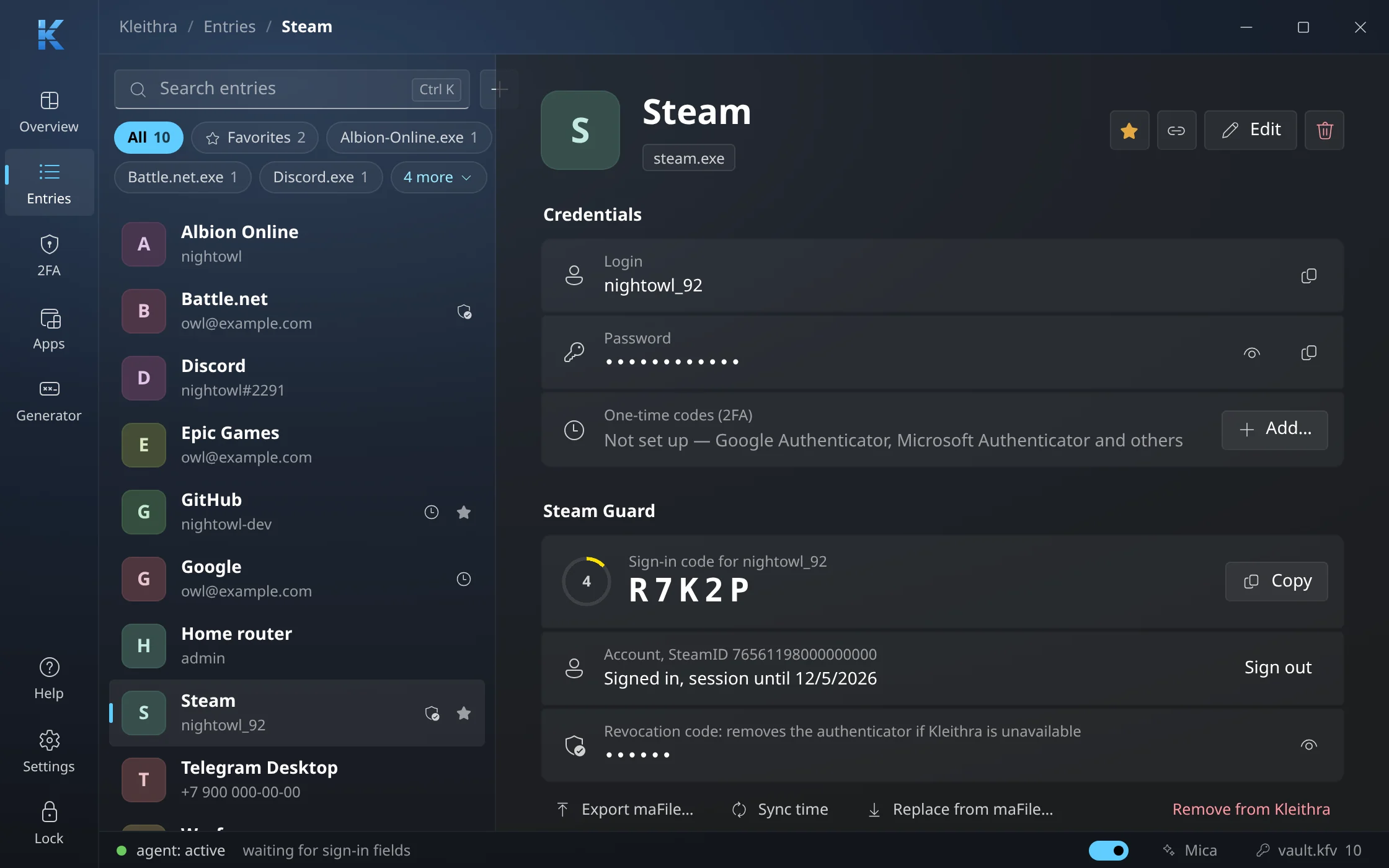
Steam Guard next to the password
The sign-in code with a countdown, the Steam session, the revocation code and trade confirmations — in the entry itself.
Every 2FA code on one page
Steam Guard, Battle.net and authenticator app codes refresh by themselves, with Community Market confirmations below.
Sites and the apps they belong to
Link a site to its launcher or game, and the site’s entries are offered there too. Kleithra also remembers who signed each program.
Autofill and auto-type
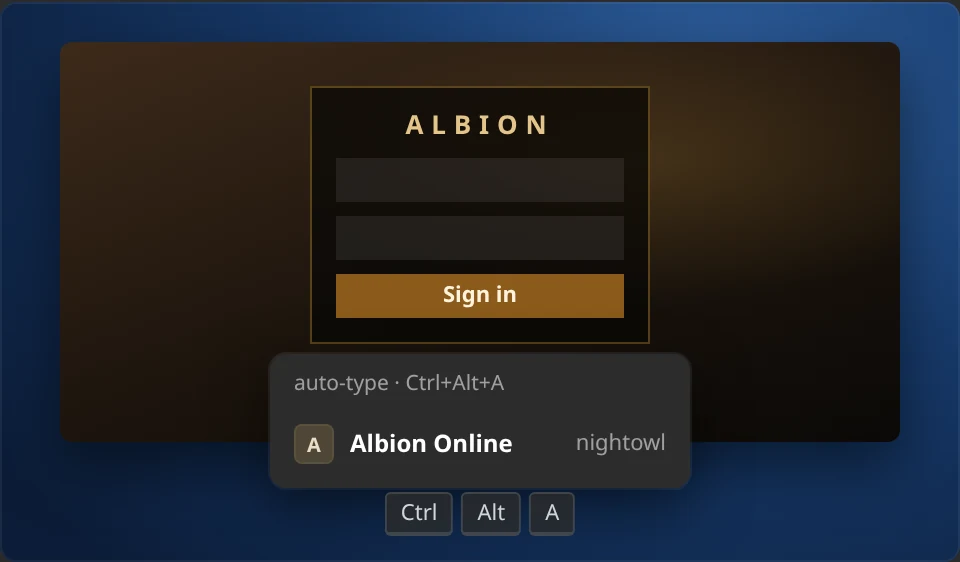
Suggestions in apps, auto-type in games with the Ctrl+Alt+A hotkey, and an offer to save a password you typed yourself.
Unlock and auto-lock
Windows Hello instead of the master password; the vault locks after inactivity, with Windows and after sleep.
Moving in from another manager
Passwords from browsers and managers, 2FA keys from a QR code and Steam Desktop Authenticator maFiles — right in the first-run setup.
Password generator
Pick the length and character sets, leave out lookalike characters, and see the strength right away.
1 / 8
In action
Right next to every login field.
Scenes from the feature tour built into Kleithra.
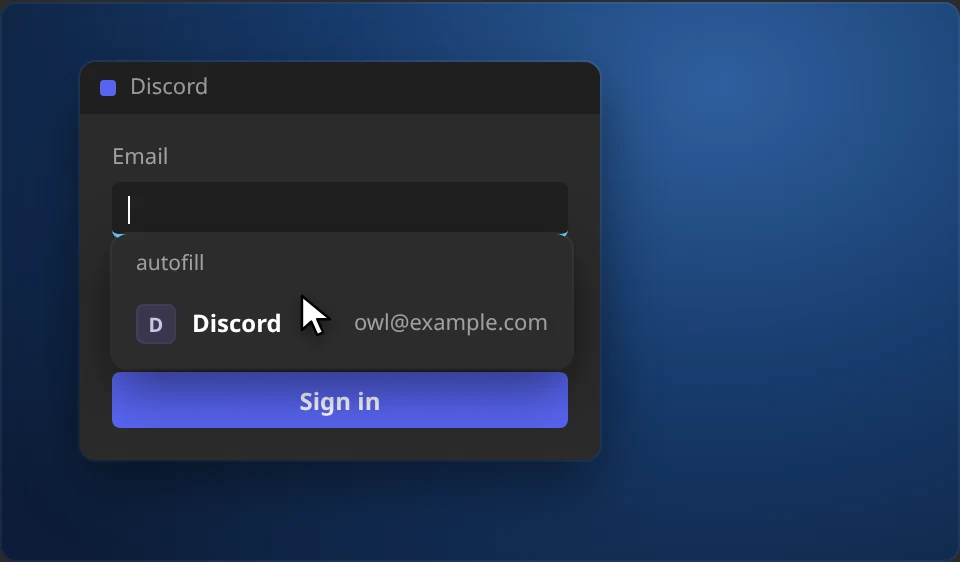
A suggestion at the login field
Click the login or password field in any program or browser, and Kleithra shows the entries for it. Picking one fills in both the login and the password.
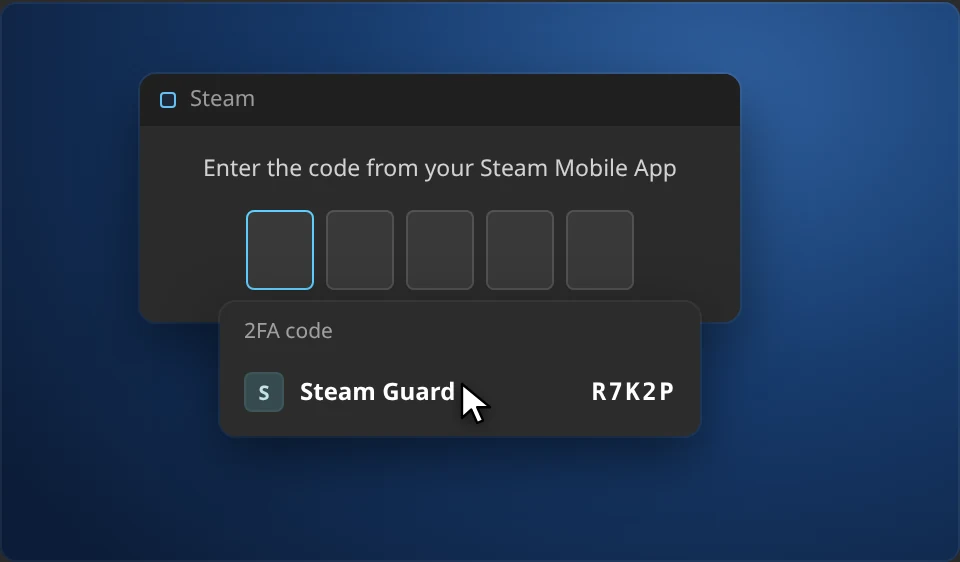
The 2FA code when it’s asked for
When a window asks for a Steam Guard, Battle.net or authenticator code, Kleithra offers to type it in. Code cells fill in by themselves, and a code about to expire waits for the next one.
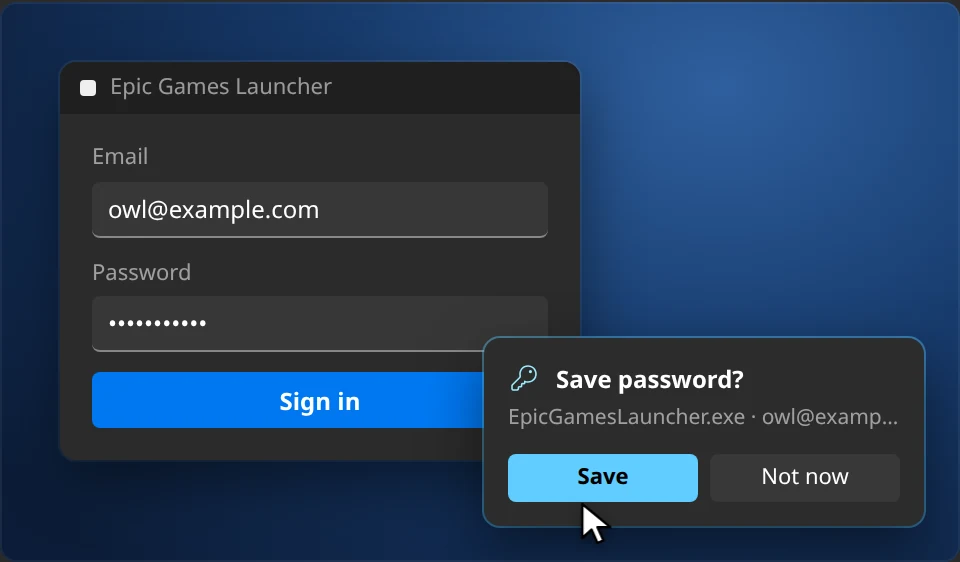
New passwords save themselves
Typed a password by hand? Kleithra offers to save it or update the entry. Keystrokes are read only in the password field and never leave memory.
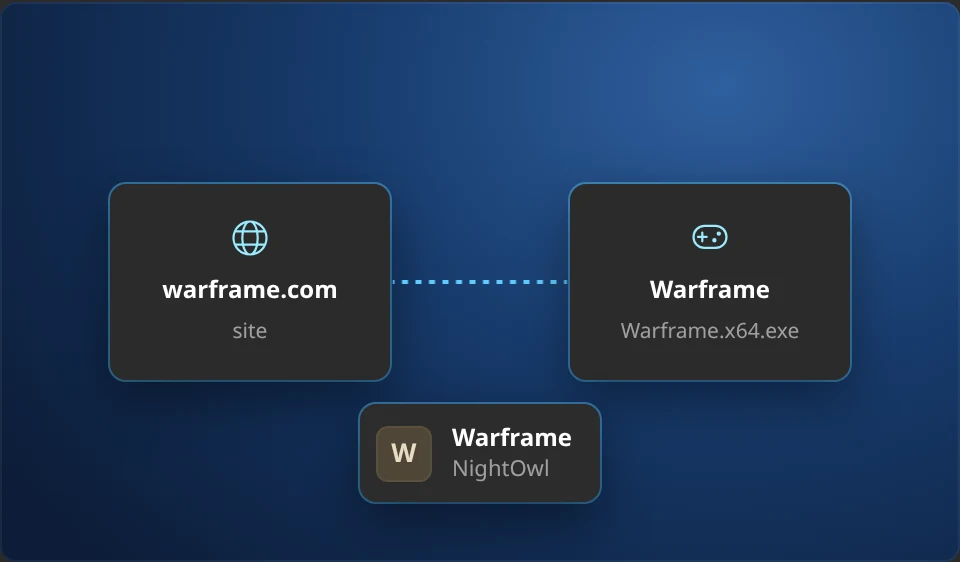
One entry for the site and the app
The password you set on a website is often needed in its launcher too. Kleithra knows pairs like warframe.com and Warframe, and you can add your own in one click.
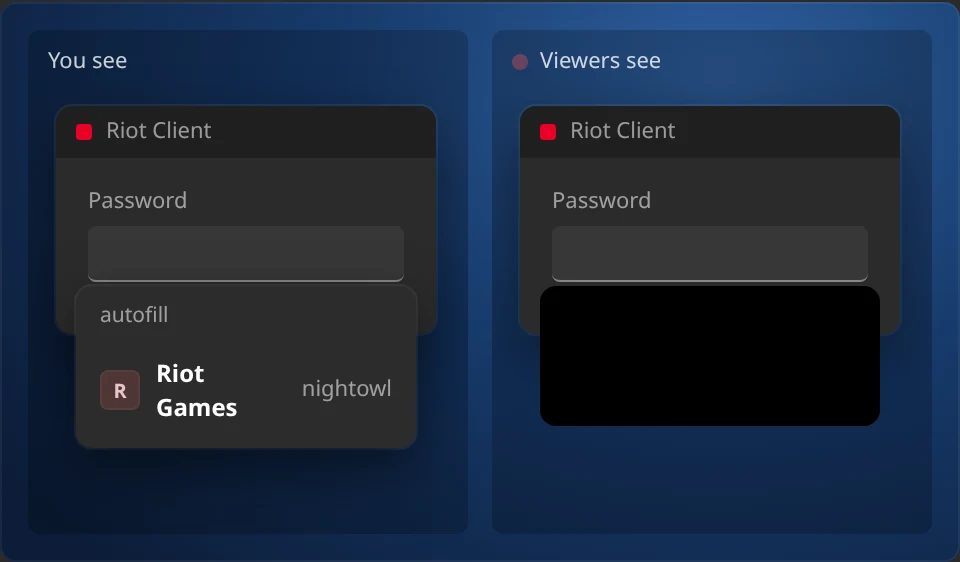
Streamer mode
On Windows, while OBS, Streamlabs or another streaming app is running, Kleithra’s windows and suggestions are visible only to you — not on the recording or the stream.
Built for gamers
One click in the login screen.
Click the login screen of your game and Kleithra shows a card with your accounts. It works out whether the login needs typing, replaces a wrong one, fills in the password and presses Enter. A hotkey works even in exclusive fullscreen.
- Finds login forms by reading the screen, in the languages your system can recognize
- Handles games run as administrator, like Warframe
- Several accounts per game, with the right one picked by its login
Steam Guard & Battle.net
Your mobile authenticator, on your PC.
Kleithra does what Steam Desktop Authenticator does: shows sign-in codes, signs in to your Steam account and confirms trades and Community Market listings. Battle.net Authenticator works the same way, with its 8-digit codes next to the password.
- Imports maFiles, including encrypted SDA ones
- Confirm trades one by one or all at once
- Adds a new authenticator and removes one with the revocation code
- Exports maFiles back: nothing stays locked in
Security
Careful about who it gives your passwords to.
Encrypted on your device
Argon2id and XChaCha20-Poly1305. The vault is a file on your PC; with sync on, only that encrypted file goes to your account — the master password never leaves the PC.
Checks the program
Kleithra remembers who signed steam.exe. A lookalike from your Downloads folder gets nothing.
Checks the website
Warns you on a lookalike domain before a password gets typed into a phishing page.
Locks itself
When you are away, when the computer locks and after sleep. Gaming counts as being here.
Your passwords stay yours.
Kleithra needs no account and keeps the vault on your PC. Sync between your computers is optional: only the encrypted vault file travels, locked with a master password we never see. Otherwise Kleithra goes online only to check for updates, load website icons and talk to Steam or Battle.net when you use those features.
Moving in takes a minute.
Import from Chrome, Edge, Firefox, Bitwarden, KeePass, 1Password and others, plus Google Authenticator and Steam Desktop Authenticator. Export is complete: nothing stays locked in.
Early access: help us polish Kleithra
Kleithra is free — every feature, for everyone. It is still in early access, so something may break: if it does, send us a bug report. It takes a minute and goes straight to the developer.
Ceník
Support Kleithra
Kleithra is free and stays free. The Supporting subscription funds its development and adds vault sync between your computers. Pay on fairstack.dev and enter the key in the app.
Supporting
Supporting Vault sync
3,00 US$ per month
- Supports the independent development of Kleithra
- Vault sync between your computers, end-to-end encrypted
- Cancel any time — every feature of the app stays free
- Up to 5 devices
Stáhnout
Download Kleithra
For Windows 10 and 11 and Linux: .deb for Ubuntu and Debian, AppImage for other distributions.
Seznam změn
-
v0.8.1
NejnovějšíOpravy- The autofill hint no longer appears in search and filter boxes such as "Find a host or ssh user@hostname…" in Termius.
- Windows: launchers with an embedded web UI (ArcheAge Classic and others built on Tauri and WebView2) get the entries of the app itself and its linked site, not the entries for localhost and 127.0.0.1.
-
v0.8.0
Novinky- Light theme. Settings → General → Appearance → Theme: as in the system (the default, following the Windows or Linux app mode), light or dark. Buttons and links use the dark shades of the Windows accent color, as in Windows 11 light apps.
Vylepšení- Windows: the autofill hint and the auto-type card move with the window when it is dragged instead of staying at the old place; minimizing the window closes the hint.
- Windows: auto-type in games in exclusive fullscreen: the sign-in form is searched on a Windows.Graphics.Capture snapshot when the regular screenshot comes out black.
Opravy- Steam QR sign-in was not offered in the Steam client: the QR code in the client's sign-in window is too small for the recognizer. Kleithra now finds it and shows Sign in as….
- The 2FA code hint no longer appears on pages that merely contain the text 2FA (for example a README on GitHub while searching the page): the browser's find bar is not a code field, and text on a page is not a code screen.
-
v0.7.1
Novinky- Help → Report a bug: a report to the developer right from Kleithra — with the app and system versions and, if you like, the log. The reply comes to your fairstack.dev account email, and My reports shows where each report stands. Without a key, the form on the site opens.
Vylepšení- With a beta version installed and the stable channel selected, Settings → Updates says a stable version comes once one newer than the installed version is out, instead of “You have the latest version”.
Opravy- Linux: links to fairstack.dev and the Steam Community Market open in the browser.
-
v0.7.0
Novinky- Kleithra is entirely free: the auto-type card in games on click, 2FA code suggestions at fields, Steam sign-in, trade confirmations and appraisal, Battle.net sign-in and authenticator setup work for everyone without a key. Kleithra Pro is gone.
- Vault sync between computers (Settings → Sync) — with the Supporting subscription, which backs development. Only the encrypted vault file goes to your fairstack.dev account — it cannot be read without the master password. Edits are sent right away, and entries from other computers appear on their own. If an entry password was changed on two computers before they synced, both are kept. A vault created on another computer can be combined with this one. If many entries are removed at once on another device, Kleithra asks before removing them here, and entries removed by sync can be brought back from a backup.
- Sync can be turned on during the first setup of Kleithra, and a second computer can download the vault from the cloud instead of creating a new one.
- The key can be changed right on the License or Sync tab with “Change key”; the previous key’s place on this computer is freed.
- The master password can be changed (Settings → Security). The encryption key changes with it, so the old password and everything encrypted with it open nothing anymore.
- Kleithra starts in the tray on every launch, not only at autostart: the vault stays locked until you open the window or autofill asks to unlock it. Turn it off in Settings → General → Start in the tray.
- “Forgot the master password?” on the sign-in screen: Kleithra explains what can be done, or sets the vault aside (the file is not deleted) and offers to create a new one.
- Linux: Kleithra offers to save a password you typed yourself or to update the entry — in apps, games and browsers running on X11 or XWayland.
Vylepšení- While the vault is locked, the “Unlock Kleithra” suggestion appears at the login field too, not only at the password field.
- The offer to add a login to an entry without one now also appears when the login is typed after the password was filled in. A login field is also recognized by an example email address as its label (“[email protected]”).
- Linux: programs linked to entries on Windows are recognized here too (Telegram, Firefox, Edge and others), in suggestions and site links. A newly installed program shows up in the programs list right away.
Opravy- When the key’s plan no longer includes sync, the Sync tab says so and offers to change the key instead of showing a sync error. It no longer offers to turn sync on with such a key — before, entering the master password still ended in an error.
- Linux: the autofill suggestion is no longer half size when Kleithra starts at sign-in before GNOME sets the screen scale, and it no longer appears in Kleithra’s own fields.
- Linux: in Firefox the password no longer lands in the login field, the field’s old value is replaced instead of appended to, and the keyboard layout no longer switches back and forth while typing.
- Linux: in sign-in dialogs inside a page (such as Twitch) the suggestion opens under the field, and the paired field is found and filled.
- Linux: notifications in the Kleithra window no longer stay on screen forever when animations are turned off in the system, and without a tray area (GNOME without the AppIndicator extension) Kleithra starts with its window instead of invisibly.
Zabezpečení- Turning sync on, replacing or deleting the cloud copy, confirming a mass removal of entries and exporting passwords, 2FA keys and Steam maFiles as plain text require the master password — even when the vault was opened with Windows Hello or the system password.
- Sync turns on only with a strong master password: a copy taken from a hacked account can be guessed without limits. It refuses to run when the computer’s clock is more than a day off the server.
- Linux: the system sign-in key is kept in kernel memory instead of the keyring on disk, and lasts 7 days and until a restart — then the master password is needed again. Keys that earlier versions left in the keyring are removed at startup.
-
v0.6.0
Novinky- Kleithra for Linux (X11 and Wayland): a .deb package and an AppImage. Suggestions at sign-in fields in apps and browsers, login and password filling, auto-type in Wine and Proton games with sign-in form recognition, the auto-type hotkey, sign-in with your system password or fingerprint instead of the master password, 2FA codes from the screen.
Vylepšení- Auto-type in games clears the login field completely (select all, then spare Backspaces) and always clears the password field before typing: repeated auto-type no longer appends the login and password to what is already there.
Opravy- A "Forgot password?" link garbled by text recognition ("Fongot Password") is no longer taken for the password field, so auto-type no longer clicks it instead of the field.
Zobrazit starší verze
-
v0.5.1
Zabezpečení- An update is installed only if the version in its digital signature matches the one the server announces: even a spoofed server cannot pass an old Kleithra version off as a new one.
- Item images and avatars in Steam confirmations are checked more strictly before they reach the Kleithra window.
-
v0.5.0
Novinky- Kleithra Pro: the Settings → License tab — enter a key bought on fairstack.dev, remove this device, links to buying and to your account. The license is checked without going online. Early access is on now: Pro features (the auto-type card in games, filling 2FA codes into fields, Steam sign-in and confirmations, attaching Battle.net) are free for everyone.
Vylepšení- Updates now come from fairstack.dev, which also hosts the Kleithra page and every version for download. Update notes are in the language of the interface.
-
v0.8.0-beta.3
Vylepšení- Steam QR sign-in can be turned on or off during the first setup.
- Windows: the Sign in as… menu at the QR code on a Steam sign-in page in a browser appears right away, without clicking a field.
Opravy- iPhone: when Steam revokes a session early, Kleithra renews it and retries by itself — when loading confirmations, trade contents and on QR sign-in, as on the computer — instead of a "Steam session expired" error.
Zabezpečení- A site with an address like `https://evil.com/[email protected]` is no longer taken for the site after `@`: before, Kleithra would have offered that site's entries on it.
- Steam QR sign-in: Kleithra looks for the QR code only on Steam sign-in pages, not on any Steam page: profiles, screenshots and the Workshop can show other people's images with a QR code that signs an attacker in. A QR sign-in from the Steam client is now approved in the Kleithra window, where you see the device, location and IP: client chat and broadcasts can show other people's images too.
-
v0.8.0-beta.2
Novinky- Steam Guard: sign in to Steam with a QR code, as in the Steam app. In the Steam client or on the website, choose to sign in with a QR code, then in Kleithra choose Scan QR code… on the account card (on a computer: from the screen, a selected area or the clipboard; on iPhone: with the camera). Before you approve, you see which device is signing in, from where and from what IP, plus a warning if Steam finds the location suspicious.
- Steam Guard: no need to scan the sign-in QR code. Kleithra notices it in the Steam client and on Steam websites as soon as it appears and shows a Sign in as… menu with your accounts. Pick an account and the sign-in is approved; a card right there confirms it. If Steam warns about the sign-in (unusual location, many sign-ins from the address), Kleithra first shows who is signing in and asks. Turn it on or off in Settings → Autofill → Steam sign-in with QR code (on Linux it stays off until you turn it on: for websites in Firefox, Kleithra captures the whole screen and gets the GNOME Screenshots permission).
- Linux: streamer mode. On Linux a window cannot be hidden from screen recording, so while you stream or record (OBS, SimpleScreenRecorder, Kooha and others), or when the mode is always on, Kleithra does not show passwords, 2FA codes and recovery codes. You can still copy and fill them, but they stay off the recording. The switch is in Settings → Privacy, in first-run setup and in the tray.
Vylepšení- iPhone: Steam confirmation notifications arrive sooner. While Kleithra is open, it checks confirmations every minute; in the background, it checks them first and for all accounts at once, and iOS can wake the app more often. The app icon shows how many confirmations await an answer.
-
v0.8.0-beta.1
Novinky- Kleithra for iPhone and iPad is in beta testing. It uses the same vault as your computer: the vault file opens on the phone with the same master password. Passwords and 2FA codes (TOTP, Steam Guard, Battle.net), Face ID unlock, logins and codes above the keyboard in Safari and apps, and sync with your computers on the Supporting subscription.
-
v0.7.0-beta.5
Novinky- Linux: Kleithra offers to save a password you typed yourself or to update the entry — in apps, games and browsers running on X11 or XWayland. Keystrokes in Wayland app windows aren’t visible, so there’s no offer there.
Vylepšení- The offer to add a login to an entry without one now also appears when the login is typed after the password was filled in. A login field is also recognized by an example email address as its label (“[email protected]”).
Opravy- Linux: notifications in the Kleithra window no longer stay on screen forever when animations are turned off in the system.
-
v0.7.0-beta.4
Vylepšení- Linux: programs linked to entries on Windows are recognized here too (Telegram, Firefox, Edge and others), in suggestions and site links. A newly installed program shows up in the programs list right away.
Opravy- Linux: the autofill suggestion is no longer half size when Kleithra starts at sign-in before GNOME sets the screen scale.
- Linux: the autofill suggestion no longer appears in Kleithra's own fields, such as the master password field.
- Linux: in Firefox the password no longer lands in the login field, the field's old value is replaced instead of appended to, and the keyboard layout no longer switches back and forth while typing.
- Linux: in sign-in dialogs inside a page (such as Twitch) the suggestion opens under the field, and the paired field is found and filled.
Zobrazit starší verze
-
v0.7.0-beta.3
Novinky- The master password can be changed (Settings → Security). The encryption key changes with it, so the old password and everything encrypted with it open nothing anymore.
- Kleithra starts in the tray on every launch, not only at autostart: the vault stays locked until you open the window or autofill asks to unlock it. Turn it off in Settings → General → Start in the tray.
- “Forgot the master password?” on the sign-in screen: Kleithra explains what can be done, or sets the vault aside (the file is not deleted) and offers to create a new one; sync on this computer turns off.
Opravy- Linux: without a tray area (GNOME without the AppIndicator extension) Kleithra starts with its window instead of invisibly.
Zabezpečení- Linux: the system sign-in key is kept in kernel memory instead of the keyring on disk, and lasts 7 days and until a restart — then the master password is needed again, and signing in with it extends the key. Keys that earlier versions left in the keyring are removed at startup.
- Turning sync on, replacing or deleting the cloud copy and confirming a mass removal of entries require the master password — even when the vault was opened with Windows Hello or the system password.
- Sync turns on only with a strong master password: a copy taken from a hacked account can be guessed without limits.
- Exporting passwords, 2FA keys and Steam maFiles as plain text requires the master password — even when the vault was opened with Windows Hello or the system password.
- Combining with the cloud vault requires this vault's master password: otherwise someone at an unlocked computer could pour the entries into a swapped cloud copy. The password that must be strong is the one the cloud copy will be encrypted with.
- Sync refuses to run when the computer's clock is more than a day off the server, and edit times from the future on another device no longer beat real edits.
-
v0.7.0-beta.2
Novinky- Sync can be turned on during the first setup of Kleithra, and a second computer can download the vault from the cloud instead of creating a new one. In Settings, sync is turned on and off with a switch.
Opravy- The Sync tab sees an activated license key right away — no need to restart Kleithra. The tab now has step-by-step instructions for turning sync on across several computers.
-
v0.7.0-beta.1
Novinky- Vault sync between computers (Kleithra Pro, Settings → Sync). Only the encrypted vault file goes to your fairstack.dev account — it cannot be read without the master password. Edits are sent right away, and entries from other computers appear on their own. If an entry password was changed on two computers before they synced, both are kept. A vault created on another computer can be combined with this one. If many entries are removed at once on another device, Kleithra asks before removing them here, and entries removed by sync can be brought back from a backup.
FAQ
Questions about Kleithra
Is Kleithra free?
Yes, completely: the vault, suggestions and filling in apps and browsers, auto-type in games, 2FA codes, Steam and Battle.net sign-in with trade confirmations, import and export — every feature is free for everyone.
The only paid part is the optional Supporting subscription. It funds the development and adds vault sync between your computers, since sync keeps an encrypted copy on our servers.
Which systems does it run on?
Windows 10 and 11, and Linux with X11 or Wayland: a .deb package for Ubuntu and Debian and an AppImage for other distributions. There is no macOS version yet.
Do I need a browser extension?
No. Kleithra reads the page address from the browser window itself and works in Edge, Chrome, Firefox, Brave, Opera, Vivaldi, Yandex Browser and others. Subdomains match too: an entry for google.com is offered on accounts.google.com.
How does it type into a game?
Like you would. Kleithra finds the login form in a snapshot of the game window, clicks into the fields and presses the keys one by one. It does not get inside the game process or change its files. In exclusive fullscreen, where a snapshot is not possible, the Ctrl+Alt+A hotkey still works.
Can you see my passwords?
No. The vault is encrypted on your computer with a key derived from the master password. With sync on, only that encrypted file goes to your fairstack.dev account; the master password never leaves the computer.
What if I forget the master password?
It cannot be recovered: only you hold the key to the vault. “Forgot master password?” on the sign-in screen explains what you can still do, or sets the old vault aside (the file is kept) and helps you start a new one.
Stop typing passwords into games.
Download Kleithra, import your passwords, and log in with one click.
Get Kleithra
 Rust
Rust
 TypeScript
 React
React